Elbrush: A Display Font for Bold Digital Branding
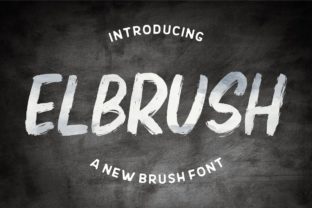
As a UI designer who ships landing pages, SaaS dashboards, and e-commerce experiences, I don’t reach for display fonts lightly. They’re not background players—they’re tone-setters, hierarchy anchors, and brand accelerants. That’s why Elbrush stands out: it’s a display font built for digital impact without sacrificing craft. Its curves feel intentional—not playful for the sake of whimsy, but confident, urban, and quietly sophisticated. It’s the kind of typeface that says “this product has taste” before the first sentence is read.
Elbrush thrives where attention matters most: hero sections, app onboarding screens, course headlines, and boutique online store banners. Its letterforms balance softness and structure—rounded terminals meet tight spacing, giving it rhythm at large sizes while avoiding visual mush. On a responsive landing page, Elbrush scales cleanly from 48px desktop headers down to 36px on tablet—no blurriness, no awkward tracking adjustments needed. It’s optimized for screen rendering, with open counters and generous x-heights that support legibility even over subtle image overlays or gradient backgrounds.
For conversion-focused layouts, Elbrush works best in high-intent zones: not body copy, navigation labels, or form fields—but hero titles, value-prop statements, CTA buttons (when sized ≥20px), and section dividers. Think “Your Next Design System Starts Here” in Elbrush over a muted gradient, paired with a crisp sans serif like Inter or Manrope for the supporting paragraph. That contrast creates immediate visual hierarchy: the eye lands on the Elbrush headline, absorbs the promise, then flows naturally into actionable detail.
It’s especially effective for brands with an elevated, creative, or lifestyle-driven identity. A coaching website might use Elbrush for its tagline (“Clarity, Crafted”) above a clean testimonial carousel. A digital art course platform could set module titles in Elbrush—“Color Theory Reimagined”, “Typography as Voice”—to signal thoughtful curation. An independent perfumery’s homepage banner gains instant distinction with “Scent Is Memory” in Elbrush, layered over a soft-focus photo of raw botanicals. In each case, the font reinforces tone without shouting—it’s contemporary cool, not trend-chasing.
Readability on mobile is non-negotiable—and Elbrush delivers when used intentionally. Avoid setting it below 24px on small screens; instead, let it anchor top-of-page elements only, with responsive CSS that swaps to a more neutral heading font (like Poppins or Lato) at narrower breakpoints if needed. On dark mode interfaces, Elbrush maintains contrast reliably against charcoal or deep navy backgrounds—just ensure your base weight is Regular or Bold (avoid Light variants for UI text). For light-on-light situations—say, Elbrush over a pale beige texture—add subtle text shadow (text-shadow: 0 1px 2px rgba(0,0,0,0.08)) to lift it off the background.
Font pairing is where Elbrush shines brightest. As a display font, it demands a strong typographic counterpoint. Pair it with a humanist sans serif (e.g., Nunito, Work Sans) for friendly, approachable digital products—or a geometric sans (like Montserrat or Space Grotesk) for tech-forward SaaS brands. For editorial or portfolio sites leaning into craftsmanship, try a low-contrast serif like Cormorant Garamond or Literata in the body. The key is contrast in function: Elbrush sets mood and marks importance; the secondary font handles clarity, scanning, and sustained reading.
Check what’s included before licensing. Elbrush typically ships with multiple weights (Light, Regular, Bold, sometimes Black), true italics (not skewed), OpenType features like stylistic alternates and ligatures, and broad language support—including Latin Extended-A for European languages and basic Vietnamese diacritics. Webfont formats (WOFF2, WOFF) are standard, and most vendors provide easy CSS embedding via CDN or self-hosted kits. If your project targets global users, verify multilingual coverage aligns with your audience—especially for accented characters in French, Spanish, or Polish interfaces.
Licensing is practical, not theoretical. Elbrush is a premium font—you’ll need a commercial license for any live web property: client websites, your own SaaS dashboard, Shopify theme assets, Notion template kits, or Figma design system files you distribute. One-site licenses cover single domains; extended licenses apply for white-label products, digital templates sold on marketplaces, or embedded use in web apps. Never assume “free download” = free for production. Legitimate licensing ensures updates, technical support, and ethical support for the foundry—critical when typography underpins your brand’s credibility.
In practice, Elbrush isn’t about decoration—it’s about intentionality. It’s the difference between a generic “Get Started” button and one that feels like an invitation. It’s how a portfolio site signals craftsmanship before a single project image loads. It’s the quiet confidence in a fintech brand’s value proposition headline—“Smarter Money, Simply Explained”—where warmth and authority coexist. Used well, Elbrush doesn’t distract; it distills.
So ask yourself: Where does your audience pause? Where do they decide? That’s where Elbrush belongs—not everywhere, but precisely where it earns its space. It’s not a utility font. It’s a signature.